OS: MAC
참고: 👉 점프 투 파이썬 - 라이브러리 예제 바로가기
069. 시스템 명령어를 실행하려면? ― subprocess(서브프로세스)
- 파이썬에서 운영체제 명령어(외부 프로그램) 를 실행하게 해주는 모듈.
- 다른 프로그램을 실행하고 그 출력/에러를 가져오거나, 입력을 보내는 것도 가능.(명령어 호출 가능)
| 구분 | 설명 | 예시 | 결과 |
| 기본 사용법: run() |
가장 간단한 방식. 시스템 명령어를 실행하고 끝나길 기다린 뒤 결과를 반환. |
import subprocess result = subprocess.run(['echo', 'hello'], capture_output=True, text=True) print(result.stdout) |
hello |
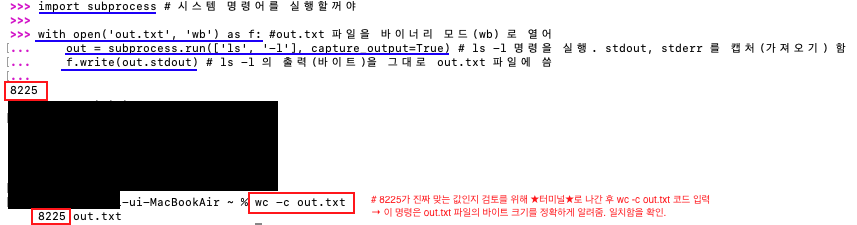
| 시스템 명령을 실행 해야할 때 | capture_output=True, text=True 옵션 사용 → stdout/stderr 문자열로 받음 예) ls, mkdir, ping, ffmpeg, curl, grep … |
import subprocess result = subprocess.run(['ls'], capture_output=True, text=True) print(result.stdout) |
# 현재 디렉토리 목록 출력 __pycache__ ...(생략)...파일 |
| 명령 실행만 하고 결과는 무시할 때 |
출력을 버릴 수 있음. 또는 check=True로 오류 발생 시 예외를 던지게 함. | subprocess.run(['mkdir', 'test_dir'], check=True) #test_dir 생성 | CompletedProcess(args=['mkdir', 'test_dir'], returncode=0) |
| 고급: Popen() 사용(파펀) | 명령을 실행한 뒤 프로세스를 계속 유지하면서 입·출력을 스트리밍하거나 실시간 제어할 때 사용. | # ping 출력 실시간 표시 import subprocess p = subprocess.Popen(['ping', '-c', '3', 'google.com'], stdout=subprocess.PIPE, text=True) for line in p.stdout: print('실시간:', line.strip()) |
실시간: PING google.com (172.217.161.206): ...(생략)...1.386 ms |
| 파이썬 코드에서 다른 파이썬 스크립트 실행 | 외부 .py 파일 실행도 가능 | # 외부 .py 파일 실행 import subprocess subprocess.run(['python3', 'mp_test4.py']) |
[1, 4, 9, 16] CompletedProcess(args=['python3', 'mp_test4.py'], returncode=0) |
| 명령어 실패 잡기 | 명령어가 실패하면 예외 발생시키기 (check=True) |
# 항상 실패(exit code = 1)를 반환하는 명령 subprocess.run(['false'], check=True) |
'true' → 0(성공) 반환 'false' → 1(실패) 반환 |
라이브러리 예제 문제: