OS: MAC
참고: 👉 점프 투 파이썬 - 라이브러리 예제 바로가기
068. 병렬로 작업을 처리하려면?-concurrent.futures(컨커런트 퓨처스)
- 멀티프로세싱과 마찬가지로 .py 파일을 만들어 터미널에서 실행하는 게 가장 안정적
- I/O 바운드(파일, 네트워크, DB) → ThreadPoolExecutor- CPU 바운드(복잡한 계산, 대량 연산) → ProcessPoolExecutor
- 둘 다 concurrent.futures 덕분에 코드 모양은 거의 비슷하게 쓸 수 있음.
- 상황에 맞춰 executor 종류만 바꿔 끼우면 됨.
| 구분 | 설명 | 예시 | 결과 |
| concurrent.futures란? | 고수준(high-level) 인터페이스로 병렬 작업을 처리하게 해주는 모듈. 내부적으로는 ThreadPoolExecutor, ProcessPoolExecutor 를 사용해서 풀(pool)을 만들고, 거기에 일을 맡기는 방식. |
(아래 행에 코드) | 코드가 훨씬 짧고 깔끔해짐. |
| ThreadPoolExecutor 기본 사용 (I/O 작업에 잘 맞음) |
여러 개의 I/O 작업 (웹 요청, 파일 읽기 등)을 스레드 풀로 동시에 처리할 때 사용. submit() / map() 으로 작업을 넘기고, future.result() 로 결과를 받음. |
# 파일 생성 cf_thread_pool.py from concurrent.futures import ThreadPoolExecutor import time def work(n): print(f"작업 {n} 시작") time.sleep(1) print(f"작업 {n} 끝") return n * 10 if __name__ == "__main__": start = time.time() nums = [1, 2, 3, 4] # 스레드 4개 풀 생성 with ThreadPoolExecutor(max_workers=4) as executor: # nums의 각 값을 work 함수에 병렬로 전달 results = list(executor.map(work, nums)) end = time.time() print("결과:", results) print("수행시간: %.3f 초" % (end - start)) # 터미널에 코드 입력 및 실행 python3 cf_thread_pool.py |
작업 1 시작 작업 2 시작 작업 3 시작 작업 4 시작 작업 2 끝 작업 1 끝 작업 4 끝 작업 3 끝 결과: [10, 20, 30, 40] 수행시간: 1.007 초 |
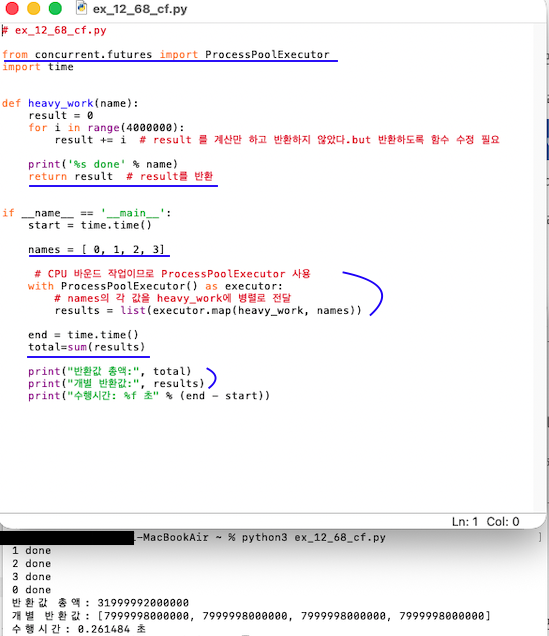
| ProcessPoolExecutor 기본 사용 (CPU 작업에 잘 맞음) | CPU를 많이 쓰는 연산(숫자 계산, 이미지 처리 등)을 프로세스 풀로 병렬 처리할 때 사용. 내부적으로 multiprocessing 기반이라 GIL 영향을 덜 받음. | # 파일명: cf_process_pool.py from concurrent.futures import ProcessPoolExecutor import time def heavy_work(n): print(f"{n} 작업 시작") total = 0 for i in range(4_000_000): total += i print(f"{n} 작업 끝") return n, total if __name__ == "__main__": start = time.time() nums = [0, 1, 2, 3] # CPU 코어 수만큼 프로세스 풀 생성 (명시적으로 4로 줘도 됨) with ProcessPoolExecutor() as executor: results = list(executor.map(heavy_work, nums) end = time.time() # 싱글 프로세스로 4번 돌릴 때보다 수행 시간이 확 줄어듦(코어 수에 따라 다름). print("결과:", results) print("수행시간: %.3f 초" % (end - start)) # 터미널에 코드 입력 및 실행 python3 cf_process_pool.py |
0 작업 시작 1 작업 시작 2 작업 시작 3 작업 시작 2 작업 끝 0 작업 끝 1 작업 끝 3 작업 끝 결과: [(0, 7999998000000), (1, 7999998000000), (2, 7999998000000), (3, 7999998000000)] 수행시간: 0.214 초 |
| submit + future.result() |
executor.submit(함수, 인자...) 로 작업 하나를 제출하면 Future 객체가 반환됨. 나중에 future.result()를 호출해서 결과를 가져올 수 있음. 원하는 타이밍에 결과를 받을 수 있어 유연함. |
# 파일명: cf_submit_example.py from concurrent.futures import ProcessPoolExecutor import time def work(n): print(f"작업 {n} 시작") time.sleep(1) print(f"작업 {n} 끝") return n * 10 if __name__ == "__main__": with ThreadPoolExecutor(max_workers=3) as executor: futures = [] for n in [1, 2, 3]: f = executor.submit(work, n) futures.append(f) # 나중에 결과 모아서 받기 results = [f.result() for f in futures] # Future 들을 모아두었다가 한 번에 결과를 꺼낼 수 있음. print("결과:", results) # 터미널에 코드 입력 및 실행 python3 cf_submit_example.py |
작업 1 시작 작업 2 시작 작업 3 시작 작업 1 끝 작업 3 끝 작업 2 끝 결과: [10, 20, 30] |
| as_completed 로 먼저 끝난 것부터 처리 |
concurrent.futures.as_completed(futures) 를 쓰면, 작업이 끝난 순서대로 Future 를 꺼낼 수 있음. 오래 걸리는 작업, 짧게 끝나는 작업이 섞여 있을 때 유용. # with 줄 바로 아래부터 futures, for, submit, results 전부 같은 깊이로 들여쓰기 |
# 파일명: cf_as_completed_example.py from concurrent.futures import ThreadPoolExecutor, as_completed import time def work(n): print(f"작업 {n} 시작") time.sleep(n) # n초 동안 잠시 대기 (걸리는 시간이 다름) print(f"작업 {n} 끝") return if __name__ == "__main__": nums = [3, 1, 2] with ThreadPoolExecutor(max_workers=3) as executor: futures = [executor.submit(work, n) for n in nums] for f in as_completed(futures): result = f.result() # 1초짜리 작업이 먼저 끝나고, 그다음 2초, 그다음 3초 순으로 결과 출력. print("먼저 끝난 작업 결과:", result) |
작업 3 시작 작업 1 시작 작업 2 시작 작업 1 끝 작업 2 끝 작업 3 끝 먼저 끝난 작업 결과: None |
라이브러리 예제 문제:

아 오늘 진짜 집중 안된다.. 흐


