OS: MAC
참고: 👉 점프 투 파이썬 - 라이브러리 예제 바로가기
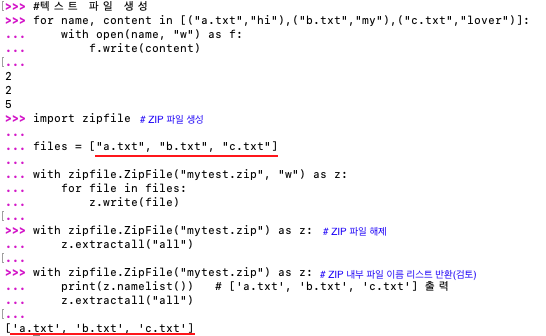
052. 여러 파일을 zip으로 합치려면? ― zipfile(집파일)
- 여러 파일을 한 번에 압축할 때 사용
- ZIP 형식이라 Windows/Mac에서 호환성 높음
| 구분 | 설명 | 예시 | 결과 |
| 모듈명 | 여러 파일을 ZIP 형식으로 묶고, 압축/해제할 수 있는 모듈 |
import zipfile | 여러 파일을 하나의 zip 파일로 저장 가능 |
| ZIP 파일 생성 | zipfile.ZipFile("파일명", "w") "a" = append(추가), "w" = 새로 생성 |
# 파일이 없으니 생성해주기 ① for name, content in [("a.txt","hello A"),("b.txt","hello B")]: with open(name, "w") as f: f.write(content) --------------------------------------- ② import zipfile with zipfile.ZipFile("test.zip","w") as z: z.write("a.txt") z.write("b.txt") |
① a.txt, b.txt 파일 생성 ② test.zip 파일 생성 a.txt, b.txt 파일이 ZIP 안에 포함됨 |
| ZIP에 파일 추가하기 |
"a" 모드로 기존 ZIP에 계속 추가 가능 |
# 파일이 없으니 생성해주기 ① with open("c.txt","w") as f: f.write("hello C") --------------------------------------- ② with zipfile.ZipFile("test.zip","a") as z: z.write("c.txt") #zipfile.write()는 기존 파일을 ZIP에추가하는기능 |
① 7 ② 기존 zip에 c.txt 추가됨 |
| 압축 옵션 지정 | compression=zipfile.ZIP_DEFLATED → 일반 압축ZIP_STORED → 압축 없음 |
# 파일이 없으니 생성해주기 ① with open("data.txt","w") as f: f.write("hello data text") --------------------------------------- ② with zipfile.ZipFile("c.zip","w",compression=zipfile.ZIP_DEFLATED) as z: z.write("data.txt") |
① 15 ② 파일이 압축된 상태로 저장됨 |
| ZIP 내부 파일 목록 확인 | namelist() ZIP 내부 파일 이름 리스트 반환 | with zipfile.ZipFile("test.zip") as z: print(z.namelist()) |
['a.txt', 'b.txt', 'c.txt'] |
| ZIP 파일 압축 해제 |
extractall() → 모든 파일 해제 extract() → 특정 파일 해제 |
with zipfile.ZipFile("test.zip") as z: z.extractall("unzipped") |
- unzipped 폴더를 만들고 ZIP 내부 파일을 그 안에 풀어 넣음. - ZIP 파일(test.zip)은 그대로 유지됨 |
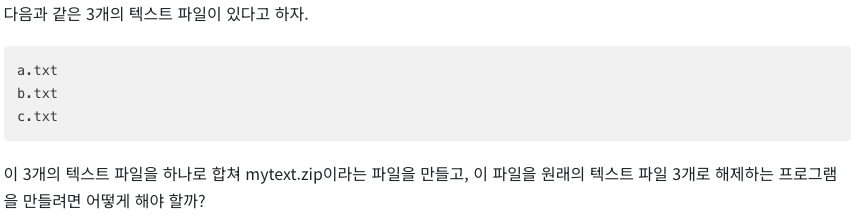
라이브러리 예제 문제:
053. 여러 파일을 tar로 합치려면? ― tarfile(타파일)
✔ tar는 “묶기” 기능 기반✔ 압축 옵션을 선택적으로 추가(gzip, bz2, lzma)✔ 폴더 전체를 묶기에 최적
| 구분 | 설명 | 예시 | 결과 |
| 모듈명 | tarfile, tar 형식으로 여러 파일을 하나로 묶는 모듈. 압축 포함 가능. |
import tarfile | .tar, .tar.gz, .tar.bz2 등 생성 가능 |
| TAR 생성 (압축 없음) | "w" 모드 → tar 아카이브 생성 | import tarfile with tarfile.open("my.tar","w") as t: t.add("a.txt") t.add("b.txt") |
출력값 없음(정상) my.tar 파일 생성 a.txt, b.txt가 포함됨 |
| TAR 생성 (gzip 압축) | "w:gz" 모드 사용 | import tarfile with tarfile.open("my.tar.gz","w:gz") as t: t.add("a.txt") |
출력값 없음(정상) gzip 압축된 tar 생성 |
| TAR 생성 (bz2 압축) | "w:bz2" 모드 사용 | import tarfile with tarfile.open("my.tar.bz2","w:bz2") as t: t.add("a.txt") |
출력값 없음(정상) bz2로 압축된 tar 생성 |
| 파일 추가 | t.add("파일명")ZIP과 달리 디렉토리도 통째로 추가 가능 ※ tarfile는 ZIP과 달리 폴더를 자동 생성해주지 않음. |
① 추가할 폴더가 없으면 먼저 생성 import os os.mkdir("myfolder") --------------------------------------- ② 생성한 폴더를 tar로 묶기 import tarfile with tarfile.open("my.tar", "w") as t: t.add("myfolder/") --------------------------------------- # 이 작업 없이 실행하면 에러 출력됨 FileNotFoundError: No such file or directory: 'myfolder/' |
출력값 없음(정상) myfolder 전체 구조가 tar 안에 포함됨 |
| TAR 압축 해제 | extractall("폴더명") → 전체 복원 |
import tarfile with tarfile.open("my.tar.gz") as t: t.extractall("out") |
out/ 폴더 생성 후 내부 파일/폴더 복원 |
| TAR 내부 목록 확인 | getnames() → 파일 이름 리스트 반환 |
import tarfile with tarfile.open("my.tar.gz") as t: print(t.getnames()) |
['a.txt', 'b.txt'] |
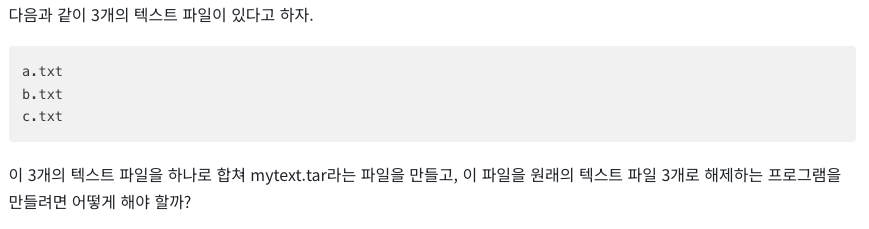
라이브러리 예제 문제:

'미래 먹거리를 위하여' 카테고리의 다른 글
| [파이썬 정복하기] 라이브러리 10장 - 암호문 다루기 (맥OS 기준) — hashlib, hmac, secrets (0) | 2025.11.20 |
|---|---|
| [파이썬 정복하기] 라이브러리 9장 - 다양한 형식의 파일 다루기 (맥OS 기준) — csv, ini (0) | 2025.11.19 |
| [파이썬 정복하기] 라이브러리 8장 - 데이터 압축하고 보관하기2 (맥OS 기준) — 파일을 압축해서 저장하기 gzip, bz2, lzma (0) | 2025.11.17 |
| [파이썬 정복하기] 라이브러리 8장 - 데이터 압축하고 보관하기1 (맥OS 기준) — 데이터 압축의 기본 zlib (0) | 2025.11.16 |
| [파이썬 정복하기] 라이브러리 7장 - 데이터 저장하고 관리하기 (맥OS 기준) (1) | 2025.11.15 |


