OS: MAC
참고: 👉 점프 투 파이썬 - 라이브러리 예제 바로가기
023. 상담원을 순서대로 배정하려면?―itertools.cycle(이터툴즈.사이클)
- 데이터 반복, 순번 배정, 무한 순회
| 구분 | 내용 | 예시 | 결과 |
| 모듈 | 반복(iteration)을 효율적으로 처리하는 도구 모음 | import itertools | 반복자(iterator) #이터레이터란 next() 함수를 사용해서 다음 값을 하나씩 차례대로 가져올 수 있는 객체 |
| itertools.cycle(iterable) | 끝나지 않는 순번표 순서 반복이 필요한 작업에 필요 = 순번표 |
import itertools days = ['월','화','수','목','금'] repeat_day = itertools.cycle(days) for i in range(8): print(next(repeat_day), end=' ') |
월~금 반복 후 다시 월요일부터 출력 👉 월 화 수 목 금 월 화 수 |
| 서버 로드밸런싱 | servers = ['서버1','서버2','서버3'] for i, s in zip(range(10), itertools.cycle(servers)): print(f"요청 {i+1} → {s}") |
서버를 순서대로 번갈아 배정 👉 요청 1 → 서버1 / 요청 2 → 서버2 / 요청 3 → 서버3 ... |
|
| 조건부 종료 |
colors = ['red','green','blue'] for i, c in enumerate(itertools.cycle(colors), 1): print(c) if i == 5: break # break는 반드시 for문 안쪽에 들여쓰기 되어야 작동함 |
무한 순환을 5회까지만 출력 👉 red green blue red green |
|
| itertools.count(start, step) | 지정한 수부터 1씩 증가하는 무한 카운터 생성 = 자동 번호기 |
import itertools for i in itertools.count(1, 2): # 1부터 2씩 증가 print(i) if i > 10: break |
1 3 5 7 9 11 |
| itertools.islice() | import itertools nums = list(itertools.islice(itertools.count(10), 5)) print(nums) |
[10, 11, 12, 13, 14] | |
| itertools.repeat(obj, times) | 같은 값을 지정한 횟수만큼 반복= 복사기 | import itertools for x in itertools.repeat('🧡', 5): print(x, end=' ') |
🧡 🧡 🧡 🧡 🧡 |
| itertools.repeat() | 라벨 반복 | import itertools nums = [10, 20, 30] for n, label in zip(nums, itertools.repeat('점수')): print(label, n) |
점수 10 점수 20 점수 30 |
| itertools.repeat() | 리스트로 변환 | import itertools print(list(itertools.repeat('OK', 3))) |
['OK', 'OK', 'OK'] |
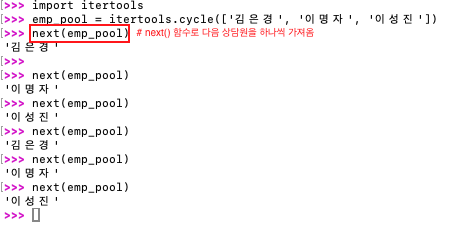
라이브러리 예제 문제: 어느 고객센터에 다음과 같이 3명이 근무 중이라 할 때 이 3명이 순서대로 고객 상담 전화를 받을 수 있도록 하는 상담 프로그램을 개발해야 한다. 상담 전화가 올 때마다 순서대로 상담원을 배정하려면 어떻게 하면 될까?
['김은경', '이명자', '이성진']
024. 연간 매출액을 계산하려면?― itertools.accumulate(어큐뮬레이트)
| 구분 | 내용 | 예시 | 결과 |
| 모듈 | 반복(iteration)을 효율적으로 처리하는 도구 모음 | import itertools | — |
| 기능 요약 | 시퀀스(리스트 등)의 값을 앞에서부터 누적(accumulate) 하며 합산 결과를 반환 | itertools.accumulate(iterable, func) | 기본값은 합계(sum) |
| 기본 사용 | 누적합 계산 | import itertools sales=[120,80,100,90,110] print(list(itertools.accumulate(sales))) |
[120, 200, 300, 390, 500] |
| (operator.mul) | 연속 곱 누적 | import itertools, operator nums=[2,3,4,5] print(list(itertools.accumulate(nums, operator.mul))) |
[2, 6, 24, 120] |
| 커스텀 누적 (최대값) |
지금까지의 최대값을 순서대로 저장 |
import itertools, operator nums=[2,8,4,10,5] print(list(itertools.accumulate(nums, max))) |
[2, 8, 8, 10, 10] |
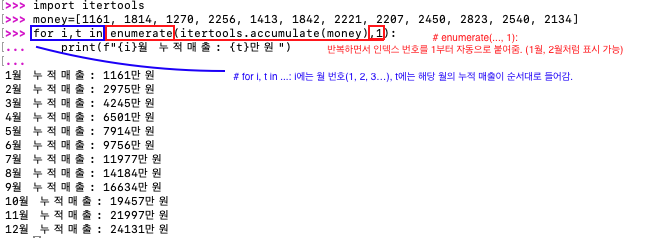
| 응용 예시 | 연간/분기별 매출 누적 | import itertools sales=[100,120,80,150] for i,t in enumerate(itertools.accumulate(sales),1): print(f"{i}분기 누적매출: {t}억 원") |
1분기 누적매출: 100억 원 2분기 누적매출: 220억 원 3분기 누적매출: 300억 원 4분기 누적매출: 450억 원 |
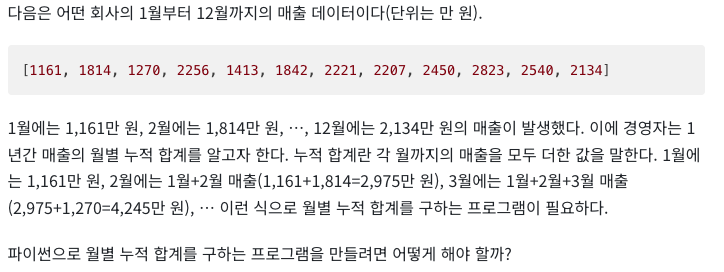
라이브러리 예제 문제:
025. 키값으로 데이터를 묶으려면? ― itertools.groupby(그룹바이)
⚠️ 반드시 정렬된 데이터에만 제대로 작동→ 정렬되지 않으면 연속된 항목만 묶임
✔️ 데이터 통계 묶기✔️ 정렬된 로그 분류✔️ 카테고리별 그룹 나누기
| 구분 | 내용 | 예시 | 결과 |
| 모듈 | 반복(iteration) 데이터를 그룹화하는 도구 |
import itertools | — |
| itertools. groupby() |
연속된 데이터를 기준(key)으로 묶어서 그룹 생성 |
itertools.groupby(iterable, key) | — |
| groupby() | 기본 | import itertools animals = ['사자', '호랑이', '원숭이', '참새', '독수리', '고양이'] animals.sort(key=len) # 길이로 정렬 (2글자 먼저, 그다음 3글자) for k, g in itertools.groupby(animals, key=len): print(k, list(g)) |
2 ['사자', '참새'] 3 ['호랑이', '원숭이', '독수리', '고양이'] |
| groupby (nums) |
숫자 | import itertools nums = [1, 1, 2, 2, 3, 3, 3, 2, 2] for k, g in itertools.groupby(nums): print(k, list(g)) |
1 [1, 1] 2 [2, 2] 3 [3, 3, 3] 2 [2, 2] |
| groupby (nums) |
숫자(오름차순 정렬) | import itertools nums = [5, 3, 1, 2, 3, 5, 4, 4] nums.sort() for k, g in itertools.groupby(nums): print(k, list(g)) |
1 [1] 2 [2] 3 [3, 3] 4 [4, 4] 5 [5, 5] |
| 조건부 그룹화 (key 함수) |
예) key=lambda x: '합격' if x >= 60 else '불합격' |
import itertools scores = [90, 85, 70, 60, 40] for grade, group in itertools.groupby(scores, key=lambda x: '합격' if x >= 60 else '불합격'): print(grade, list(group)) # groupby는 정렬되지 않은 데이터에서 “연속된 구간만” 묶는다. 그래서 보통은 먼저 정렬 후 그룹화한다. |
합격 [90, 85, 70, 60] 불합격 [40] |
| groupby (.., key=len) |
문자열 그룹화 | for k, g in itertools.groupby('aaabbcaaa'): print(k, list(g)) |
a ['a','a','a'] b ['b','b'] c ['c'] a ['a','a','a'] |
| lambda w: w[0] → 단어의 첫 글자로 그룹화 |
특정 단어의 첫 글자 기준 정렬 |
import itertools words = ['apple', 'banana', 'apricot', 'blueberry', 'cherry'] words.sort(key=lambda w: w[0]) for k, g in itertools.groupby(words, key=lambda w: w[0]): print(k, list(g)) |
a ['apple', 'apricot'] b ['banana', 'blueberry'] c ['cherry'] |
라이브러리 예제 문제:
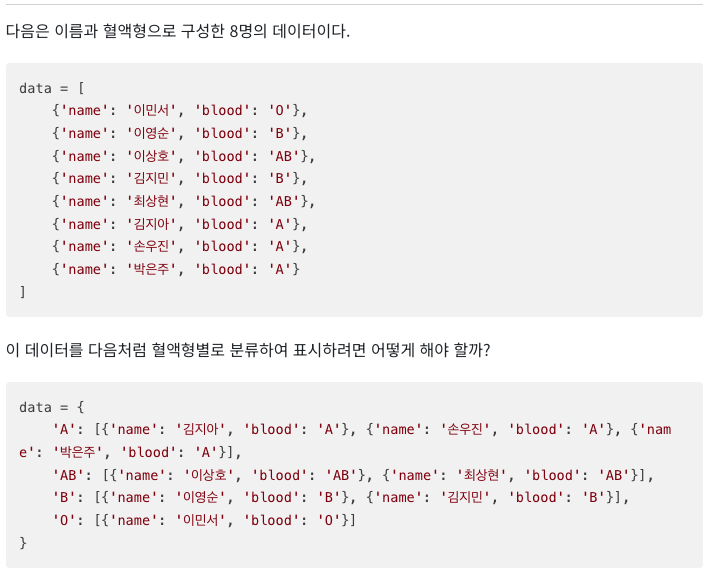
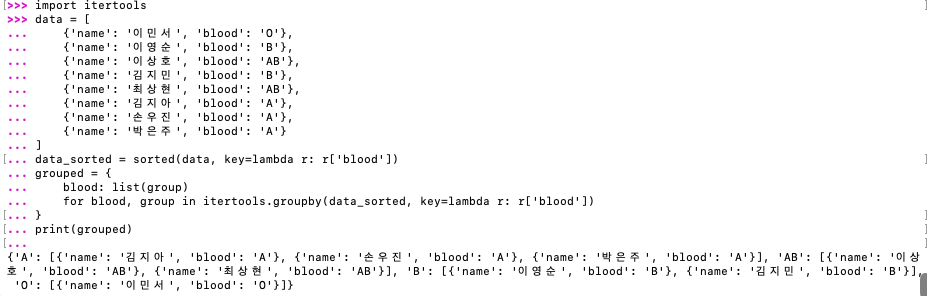
이 경우에는 더 쉬운 defaultdict(list)를 사용한다.

026. 부족한 것을 채워 묶으려면? ― itertools.zip_longest
| 구분 | 내용 | 예시 | 결과 |
| 모듈 | 반복(iteration)되는 데이터를 길이에 상관없이 묶을 수 있는 도구 | import itertools | — |
| 기본 개념 | zip()과 달리, 길이가 다른 시퀀스도 끝까지 묶어줌 → 부족한 부분은 fillvalue로 채움 |
itertools.zip_longest(*iterables, fillvalue=None) | — |
| 예시 ① | import itertools names = ['Tom', 'Jane', 'Lucy'] scores = [90, 85] for n, s in itertools.zip_longest(names, scores): print(n, s) |
Tom 90 Jane 85 Lucy None |
|
| 예시 ② (fillvalue 지정) | import itertools names = ['Tom', 'Jane', 'Lucy'] scores = [90, 85] for n, s in itertools.zip_longest(names, scores, fillvalue='결석'): print(n, s) |
Tom 90 Jane 85 Lucy 결석 |
|
| 예시 ③ (리스트로 묶기) | import itertools names = ['A', 'B', 'C'] scores = [100, 80] result = list(itertools.zip_longest(names, scores, fillvalue=0)) print(result) |
[('A', 100), ('B', 80), ('C', 0)] | |
| 차이점 | zip()은 짧은 쪽 기준으로 멈춤 zip_longest()는 긴 쪽 기준으로 끝까지 채움 |
라이브러리 예제 문제:


027. 순서를 생각하며 카드를 뽑으려면? ― itertools.permutations
(퍼뮤테이션즈)
| 구분 | 내용 | 예시 | 결과 |
| 모듈 | 조합, 순열 등 반복 가능한 데이터의 조합을 생성하는 도구 |
import itertools | — |
| 기본 개념 | r개 원소를 뽑는 모든 순열 (순서 중요)을 반환 |
itertools.permutations(iterable, r=None) | — |
| 예시① | itertools.permutations(,) | import itertools cards = ['A', 'B', 'C'] result = list(itertools.permutations(cards, 2)) print(result) |
[('A', 'B'), ('A', 'C'), ('B', 'A'), ('B', 'C'), ('C', 'A'), ('C', 'B')] |
| 예시② | (모든 순서의 조합) | import itertools nums = [1, 2, 3] for p in itertools.permutations(nums): print(p) |
(1, 2, 3) (1, 3, 2) (2, 1, 3) (2, 3, 1) (3, 1, 2) (3, 2, 1) |
| 예시③ | (문자열 순열) | import itertools letters = 'ABC' print([''.join(p) for p in itertools.permutations(letters, 2)]) |
['AB', 'AC', 'BA', 'BC', 'CA', 'CB'] |
| 예시④ | (길이 지정 생략) | list(itertools.permutations(['A','B','C'])) | [('A', 'B', 'C'), ('A', 'C', 'B'), ('B', 'A', 'C'), ('B', 'C', 'A'), ('C', 'A', 'B'), ('C', 'B', 'A')] |
| 순서 무관 조합 |
itertools.combinations (iterable, r) |
import itertools list(itertools.combinations(['1', '2', '3'], 2)) # 3장의 카드에서 순서에 상관없이 2장을 골라라 |
[('1', '2'), ('1', '3'), ('2', '3')] |
| 중복 포함 가능 데카르트 곱 |
itertools.product (iterable, repeat=n) # 모든 경우의 수’ 를 만들어주는 함수 |
import itertools result = list(itertools.product([1, 2], [3, 4])) print(result) |
[(1, 3), (1, 4), (2, 3), (2, 4)] |
라이브러리 예제 문제: 1, 2, 3 숫자가 적힌 3장의 카드에서 두 장의 카드를 꺼내 만들 수 있는 2자리 숫자를 모두 구하려면 어떻게 해야 할까?

028. 로또의 모든 가짓수를 구하려면? ― itertools.combinations
| 구분 | 내용 | 예시 | 결과 |
| 모듈 | 조합(Combination)과 순열(Permutation) 등을 다루는 반복 도구 |
import itertools | — |
| 기본 개념 | 순서를 고려하지 않고 r개를 뽑는 모든 조합 생성 (순서 무시) |
itertools.combinations(iterable, r) | — |
| 예시① | 기본 사용 | import itertools nums = [1, 2, 3, 4] result = list(itertools.combinations(nums, 2)) print(result) |
[(1, 2), (1, 3), (1, 4), (2, 3), (2, 4), (3, 4)] |
| 예시② | 문자열 조합 | import itertools letters = 'ABCD' print([''.join(c) for c in itertools.combinations(letters, 2)]) |
['AB', 'AC', 'AD', 'BC', 'BD', 'CD'] |
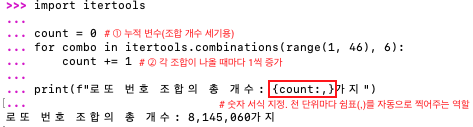
| 예시③ | 로또 경우의 수 (45개 중 6개 선택) |
import itertools lotto = itertools.combinations(range(1, 46), 6) print(sum(1 for _ in lotto)) |
8145060 |
| 예시④ | 중복 조합 | import itertools print(list(itertools.combinations_with_replacement([1,2,3], 2))) |
[(1, 1), (1, 2), (1, 3), (2, 2), (2, 3), (3, 3)] |
라이브러리 예제 문제: 1~45 중 서로 다른 숫자 6개를 뽑는 로또 번호의 모든 경우의 수(조합)를 구하고 그 개수를 출력하려면 어떻게 해야 할까?
※ 참고
| 함수 | 중복허용 | 순서 고려 | 예시 결과(입력 [1,2], 2개 뽑기) |
| permutations | ❌ | ✅ | (1,2), (2,1) |
| combinations | ❌ | ❌ | (1,2) |
| product | ✅ | ✅ | (1,1), (1,2), (2,1), (2,2) |
.tip
서식 설명 예시 결과
| 서식 | 설명 | 예시 및 결과 |
| {num} | 기본 출력 | 8145060 |
| {num:,} | 천 단위 구분 기호 추가 | 8,145,060 |
| {num:_} | 언더바(_)로 구분 | 8_145_060 |
| {num:,.2f} | 천 단위 구분 쉼표 + 소수점 둘째 자리까지 | 8,145,060.00 |
'미래 먹거리를 위하여' 카테고리의 다른 글
| [파이썬 정복하기] 라이브러리 6장 - 파일과 디렉터리 다루기1 (맥OS 기준) ★ 라이브러리로 파일 다루기 — pathlib, os.path, fileinput 완전정리 (0) | 2025.11.12 |
|---|---|
| [파이썬 정복하기] 라이브러리 5장 - 함수형 프로그래밍 다루기2 (맥OS 기준) (0) | 2025.11.11 |
| [파이썬 정복하기] 라이브러리 4장 - 수학과 숫자 다루기 (맥OS 기준) (0) | 2025.11.09 |
| [파이썬 정복하기] 라이브러리 3장 - 다양한 데이터 다루기6 (맥OS 기준) (1) | 2025.11.08 |
| [파이썬 정복하기] 라이브러리 3장 - 다양한 데이터 다루기5 (맥OS 기준) (1) | 2025.11.07 |


